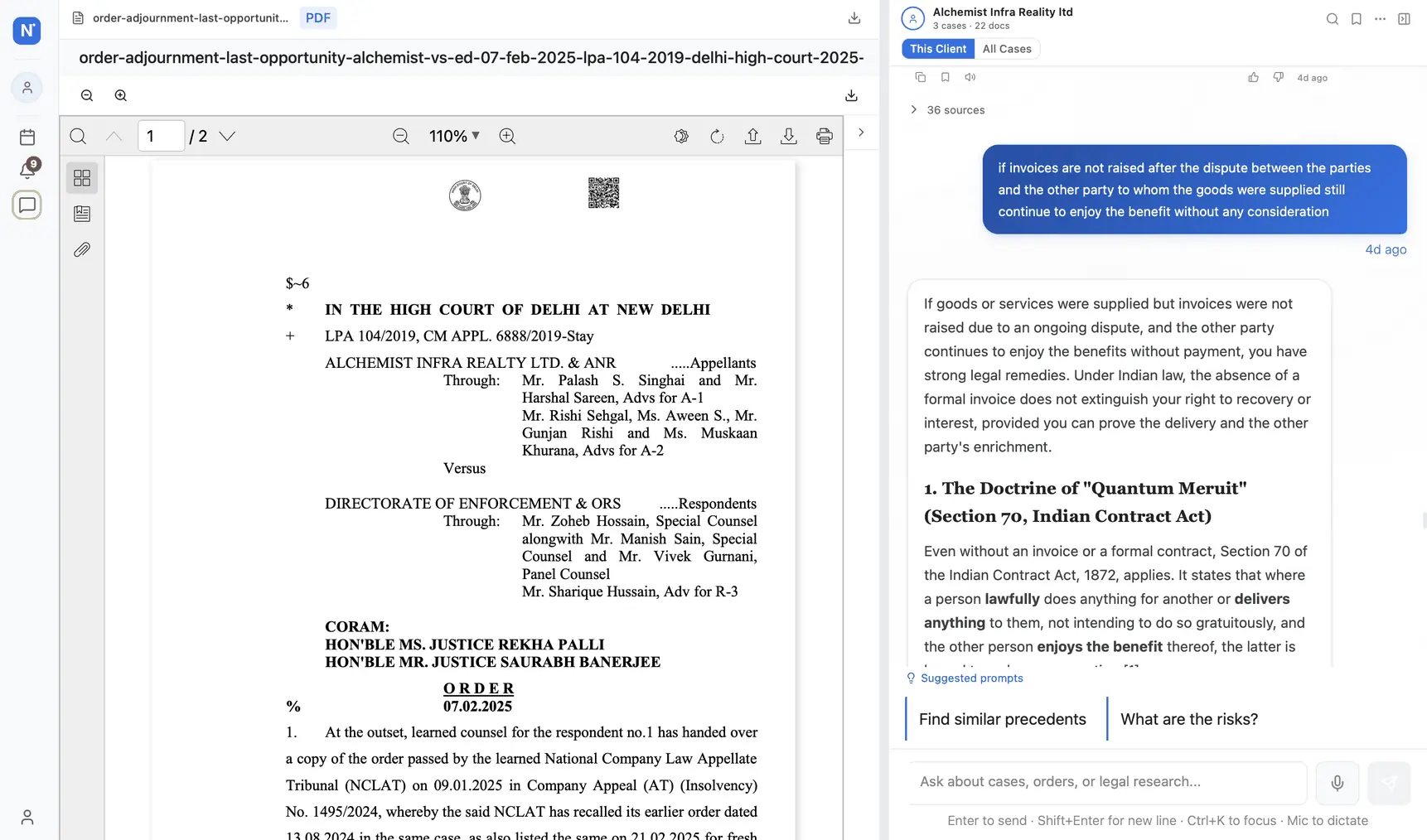
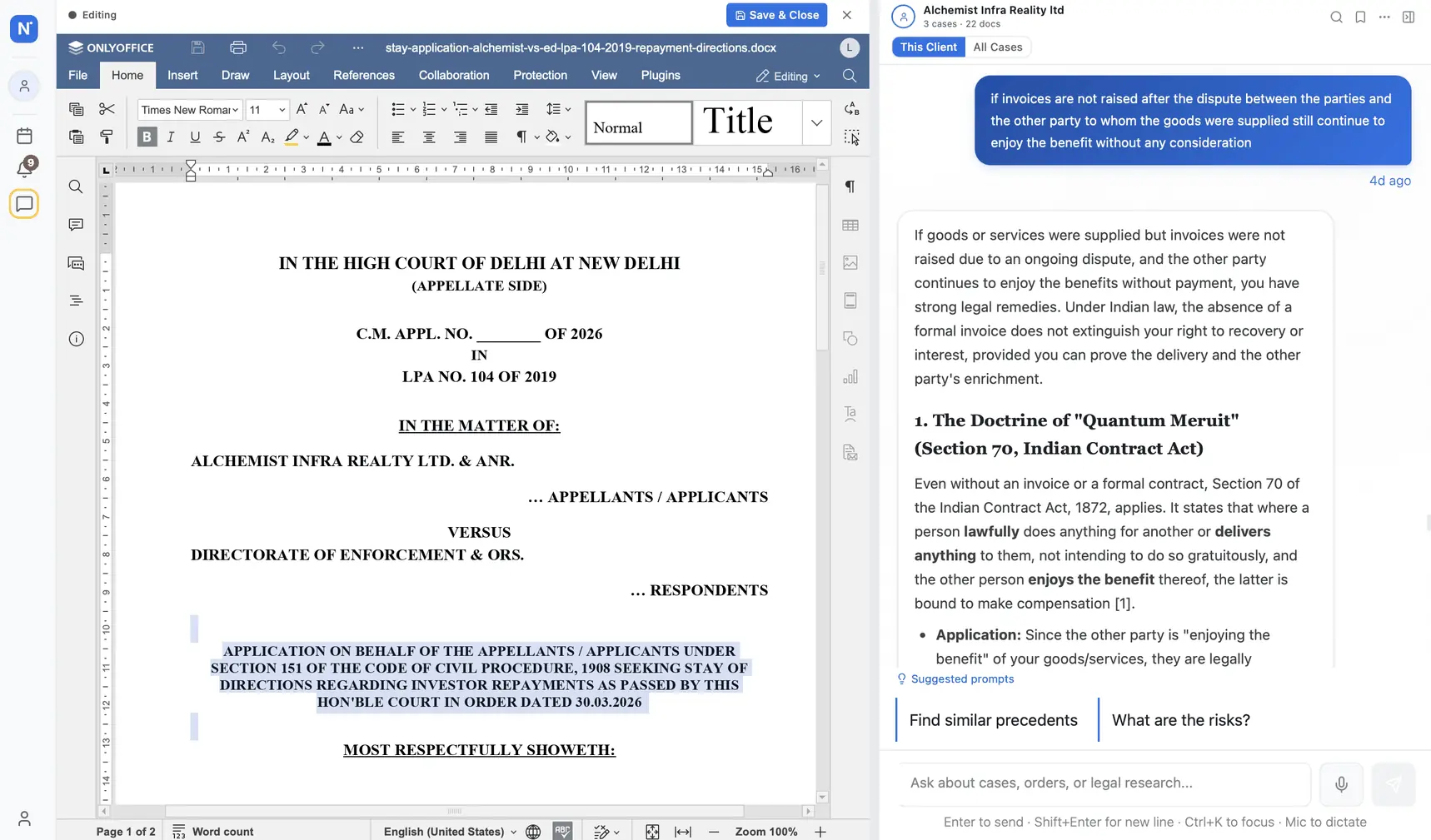
Your legal documents, in one place — templates, viewer, collaboration
Upload court orders, generate pleadings from 100+ Indian templates, collaborate on drafts with your team in real time — all without leaving Nowlez and without juggling Word, Dropbox, and email drafts.
Document management is where most legal practices haemorrhage time. A single matter might have 15 PDFs from the court, 8 versions of a pleading in a partner\'s inbox, 4 drafts of a contract on someone\'s desktop, and an annotated deposition from the junior that nobody can find at 10pm the night before a hearing. Practices hire paralegals to rebuild order out of this chaos every morning. It is a real cost, and it is a recurring one.
Nowlez replaces the folder-and-Dropbox arrangement with a matter-centric document store: every file is tagged to a case, classified on upload, OCR\'d if needed, and cross-linked to the other files it references. The PDF viewer is in-browser; the DOCX editor is collaborative (powered by OnlyOffice). When it\'s time to draft — a plaint, a vakalatnama, a revision petition — the template library writes the first pass from your case data so you\'re editing, not typing boilerplate.
Matter view — 15 files across a complex litigation, every one tagged and searchable.
What\'s included
100+ Indian Legal Templates
Vakalatnama, plaint, written statement, bail application, writ petition, legal notice, and more — all pre-filled from your client and case data.
In-Browser PDF + DOCX Viewer
Open court orders, contracts, and pleadings without downloading. Annotate, highlight, share a link. No Acrobat dance.
Real-Time Collaborative Editing
OnlyOffice powers multi-user editing with track-changes, comments, and full version history. Included with Chambers.
Who uses this, and how
Trial-court practitioner
Generates a vakalatnama for every new matter in 30 seconds, auto-filled with the client\'s name, address, and the matter details. No more retyping the same block of party-details into a Word template.
→ Saves 15 minutes per new client intake
Commercial disputes partner
Uploads the 200-page counter-affidavit, gets a classified summary and a list of all dates mentioned in under a minute. Associates can search "limitation" across every document in the matter.
→ Brief prep 3x faster
4-lawyer civil chamber
Two associates co-drafting the reply; senior leaves inline comments from the airport. Every comment resolved, every change attributed, one final version at the end — not 7 files named "final_v3_FINAL.docx".
→ Zero version-control drama
Drafting, before and after
Old way
1
Find the template
Hunt through OneDrive / email / pen-drive for "vakalatnama template final v2 (corrected).docx".
2
Copy-paste party details
From the client intake sheet, the previous matter, or a WhatsApp screenshot.
3
Format manually
Line breaks, stamp paper notes, advocate signature block — every time, same fiddly work.
4
Email for review
Partner review in one inbox, associate edits in another, version history lost.
With Nowlez
1
Pick the template from the library
One click on "Vakalatnama" from the matter view. No file-hunting.
2
Auto-populated
Client, matter, court, advocate details auto-filled from the matter record.
3
Edit in-browser
OnlyOffice editor with track-changes. Share a link for collab review; everyone sees live cursors.
4
Version history preserved
Every save is a version; every comment is attributed. Export to DOCX when ready to print.
OnlyOffice collaborative edit — track changes, comments, live cursors. All inside Nowlez.
Common questions
PDF, DOCX, DOC, ODT, RTF, and common image formats (JPG, PNG, TIFF, HEIC). Images are OCR'd on upload so you can full-text search a scanned order the same as a native PDF. Upload size limit is 50 MB per file; a 500-page court order typically compresses to under 10 MB.
Every document is analyzed on upload: classified (order, pleading, evidence, contract, etc.), key dates extracted, parties and advocates identified, and a 3-5 sentence summary generated. This happens in under 30 seconds for most documents. You can search across every summary in your account from the global search bar.
Yes, for documents that are client-specific rather than matter-specific — e.g. a New-Year tax-demand update letter to all retainer clients. Pick the template, select "generate for all clients" (or filter by tier / practice area), and Nowlez outputs one personalized DOCX per client.
Template references to IPC / CrPC / Evidence Act have been mapped to BNS / BNSS / BSA equivalents for matters filed on or after 1 July 2024. The template chooser asks you the filing date and picks the correct section references automatically. Pre-transition templates remain available for pending cases that continue under the legacy regime.
Yes, on Chambers. Nowlez uses OnlyOffice as its editor — multiple team members can open the same document, see each other's cursors, leave comments, and track changes. The edit history is preserved per-matter so you can see who changed what and when.
All documents are encrypted at rest using AES-256 and in transit over TLS 1.3. Access is per-matter — a team member with access to Case A does not automatically see documents for Case B. Document downloads are logged; an audit trail is included with Chambers. We do not use your documents for AI model training.
Yes. Export all documents (with full version history, comments, and annotations intact) as a ZIP from Account Settings at any time. DOCX files export as editable .docx; PDFs stay as PDF. The export includes a CSV index so you can find anything you need later without re-opening Nowlez.
Our blog posts (vakalatnama format, plaint drafting, etc.) include example text but not downloadable DOCX templates on the public side. Full template library is available inside the product after a free-trial signup — 30 days, no credit card, no commitment.
Upload + viewer on every plan. Full template library and collaborative OnlyOffice editing included with Chambers.